

Introduction to Duall Master Device SDK
Welcome to the Duall Master Device SDK documentation. Our Software Development Kit (SDK) is designed to provide developers with a powerful and flexible tool to connect and integrate their applications with our state-of-the-art access control hardware devices. By offering a RESTful API, the Duall Master Device SDK ensures seamless communication between your software and our devices, simplifying the development process and enabling advanced access control features with minimal effort.
Supported Hardware Devices
The Duall Master Device SDK currently supports the following hardware devices:
- ITouch PopX: A cutting-edge access control terminal known for its sleek design and user-friendly interface, suitable for various secure access needs. It supports NFC Card, NFC Phone and QR.
- DQ-Mini +: A compact and versatile waterproof device, ideal for small to medium-sized installations that require reliable access control. It supports NFC Card, NFC Phone and QR.
- ICU 300N: A robust and advanced device, designed for demanding environments where security and performance are paramount. The ICU-300N is a powerful controller which support many kinds externals readers from RF, Passcode to QR readers.
These devices have been chosen for their reliability, advanced security features, and ease of integration, ensuring that you can provide a top-notch access control solution to your customers.
Features
The Duall Master Device SDK offers a comprehensive set of features that empower developers to build sophisticated access control systems:
- Device Detection and Registration: Automatically detect and register devices that connect to the system, simplifying setup and configuration.
- Configuration and Status Management: Retrieve and set device configuration information, as well as monitor real-time status, to ensure optimal operation of your access control system.
- User Data and Access Rules: Send user data and access rules to devices, enabling precise control over who has access to what areas and when.
- Real-Time Event Logging: Receive event logs in real time for access activities on devices, allowing for immediate response and detailed access monitoring.
- Remote Control Commands: Issue device instructions such as opening/closing doors, activating/deactivating emergency mode, and more, providing versatile control options for various scenarios.
- Firmware Updates: Remotely update device firmware, ensuring that your access control system benefits from the latest features and security enhancements.
Installation and Deployment
The Duall Master Device SDK is designed to be installed on a server, supporting both Linux and Windows operating systems. This flexibility allows you to choose the environment that best fits your infrastructure and operational requirements.
Docker Deployment
To further streamline the deployment and integration process, the Duall Master Device SDK supports deployment using Docker as a microservice. This approach allows for easy integration with all modern tech stacks, offering developers the flexibility to incorporate the SDK into their projects without worrying about compatibility issues. The use of Docker encapsulates the SDK in a container, making it simpler to deploy, scale, and manage alongside other components of your infrastructure.
Installation
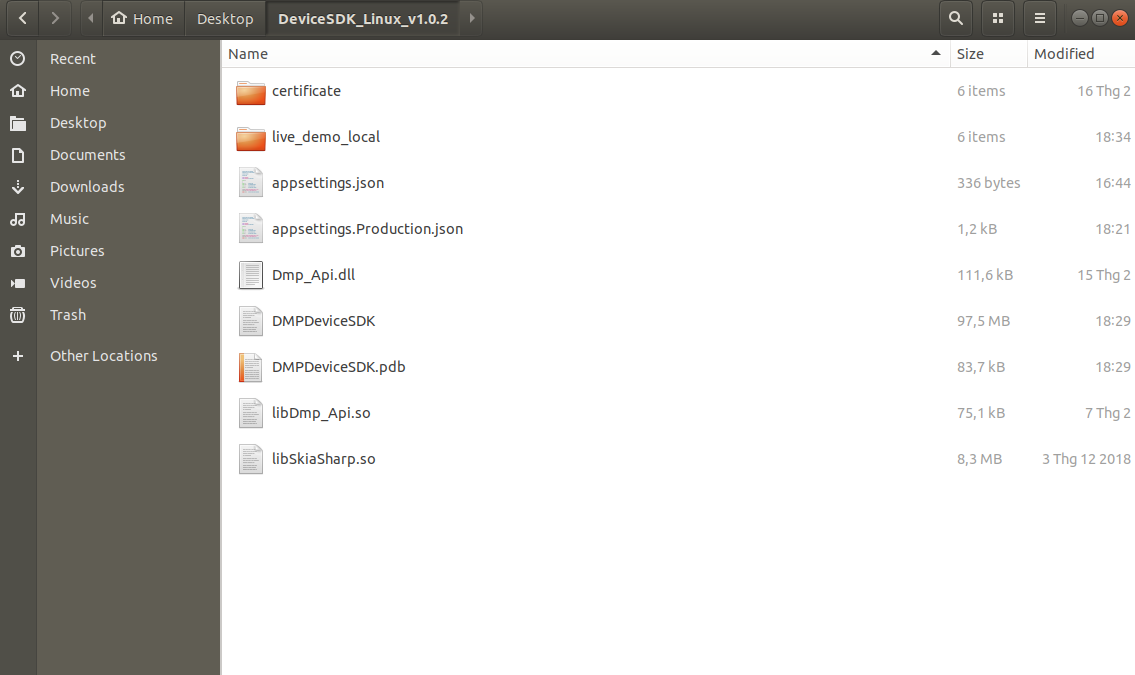
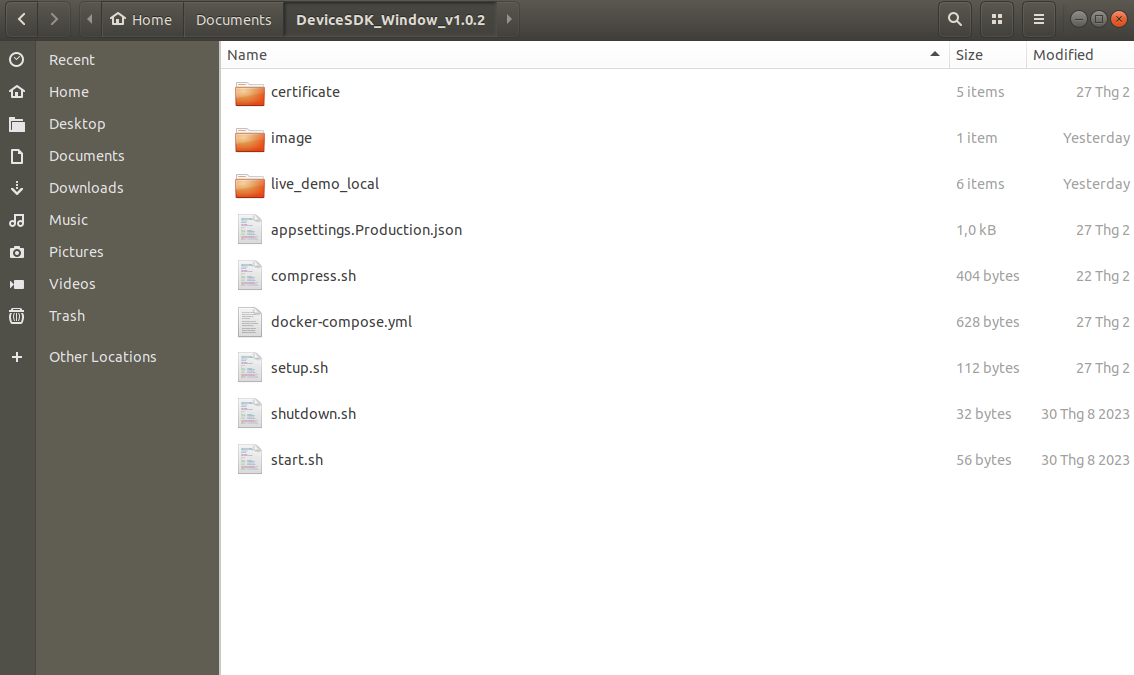
You can Download SDK here. We have 2 different installation package for Window and Linux. The packages contents are described below
Linux:
- File
appsettings.Production.jsonincludes the setting of the application. - File
DMPDeviceSDKto run the application. - File
DMPDeviceSDK.pdbincludes a package of application. - Files
Dmp_Api.dll,libDmp_Api.soandlibSkiaSharp.sois used to authorize device when it connect to application. - Folder
certificateinclude files certificates for TLS communication. - Folder
live_demo_localinclude file html live demo sdk.
Window:
- File
appsettings.Production.jsonincludes the setting of the application. - File
setup.shto load image of device SDK in folder image. - File
start.shto start container device SDK. - File
shutdown.shto stop container device SDK. - Folder
certificateinclude files certificates for TLS communication. - Folder
imageinclude docker image of device SDK. - Folder
live_demo_localinclude file html live demo sdk.
Dependencies
Linux
No special dependency is required.
Window
Git Bash: Download and install Git Bash from the official website: Git BashDocker Desktop: Download and install Docker Desktop from the official website: Docker Desktop
Application Configuration
The application setting file JSON structured like this:
{
  "QueueConnectionSettings": {
    "Host": "localhost",
    "VirtualHost": "/",
    "Port": 1883,
    "PortSsl": 8883,
    "CertPassphrase": "dmpw-rabbitmq-test",
    "DeviceCaCertificate": "/app/certificate/ca_certificate.pem",
    "DeviceClientKey": "/app/certificate/client_key.pem",
    "DeviceCientCertificate": "/app/certificate/client_certificate.pem",
    "DeviceServerCertificate": "/app/certificate/server_certificate.pem",
    "DeviceServerKey": "/app/certificate/server_key.pem"
  },
  "AppSettings": {
    "Port": 5000
  },
  "Jwt": {
    "SecretKey": "F7peYX7825YkwzFsVHhGftCxGF4yExvu4TK4m3V5N8DLUtMpnGajabYjgjzZ",
    "ExpiryMinutes": "300",
    "ExpiryRefreshToken": "6",
    "Issuer": "duali",
    "ValidateLifetime": true
  },
  "DefaultAccount": [
    {
      "UserName": "admin",
      "PassWord": "admin123"
    },
    {
      "UserName": "client",
      "PassWord": "client123"
    }
  ]
}
File appsettings.Production.json includes the setting of the application.
QueueConnectionSettings:
Host: This is host of application, default is localhostPort: This is port mqtt no use SSLPortSsl: This is port mqtt use SSL with certificate.CertPassphrase: This is default clientId of application.DeviceCaCertificate: This is file certificate of mqttclient to access to mqtt server of application. (If you use MqttFx, you can use this file to access to server mqtt).DeviceClientKeyandDeviceCientCertificate: Certificate files used to authorize device when it connect to application.DeviceServerCertificateandDeviceServerKey: Certificate files used to config the mqtt server of application.
AppSettings:
Port: 5000 is port default of application.
Jwt:
SecretKey: This is a secret string used for signing and decoding JWT.ExpiryMinutes: The expiration time of the JWT in minutes.ExpiryRefreshToken: The expiration time of the Refresh Token, also in months.Issuer: The issuer (entity that issues) of the JWT.ValidateLifetime: A flag indicating whether the JWT should be checked for its lifetime. If set to true, the JWT will be considered invalid after expiration.
DefaultAccount: This is a list default accounts allow to login to application.
NOTE : In Windows, you don't need to update paths to certificate files. However, in Linux, you must update the paths to the certificate files.
Run SDK server
Linux
Extract file (DeviceSDK_Linux_v1.0.2.zip) in link download live demo.
- Open terminal in this folder then run
./DMPDeviceSDK.
Linux:
./DMPDeviceSDK
Window
Window:
./setup.sh
./start.sh
- Open Docker Desktop.
- Extract file (DeviceSDK_Window_v1.0.2.zip).
Open git bash in this folder .
- Step 1: Run
./setup.shto load image in folderimage. - Step 2: Run
./start.shto start container(To stop this container, execute the command./shutdown.shin Git Bash.).
- Step 1: Run
Check SDK started
- Check if the SDK has started by accessing the site on the default port (5000). If access is successful, it indicates that the SDK has been started. http://localhost:5000/swagger/index.html
Setup device to connect to SDK server
ICU-300N
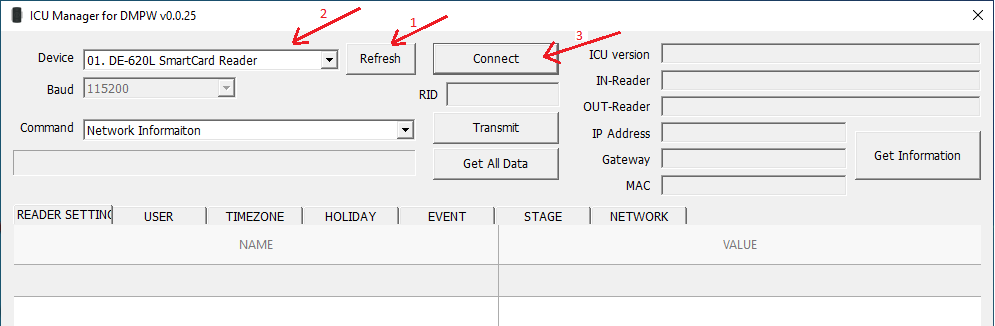
Step 1: Connect device to your computer then open application 'ICU Manager for DMPW'.
Step 2: Click 'Refresh' to refresh list device connect to your computer. Then select the device you want config and click 'Connect'.
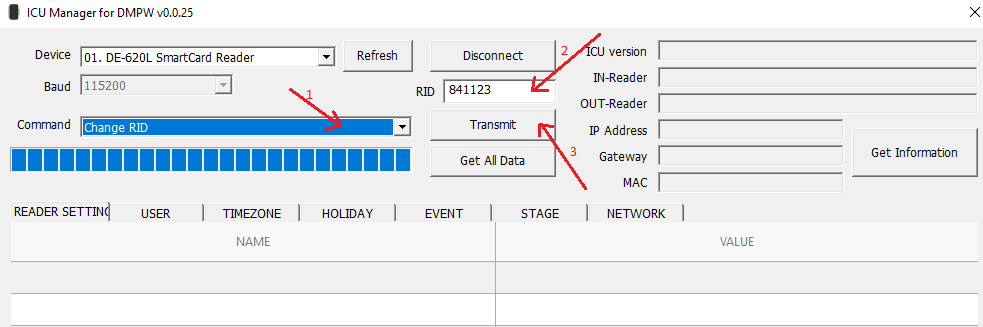
Step 3: If you want change RID of device, select Command 'Change RID' then enter your RID and click 'Transmit'.
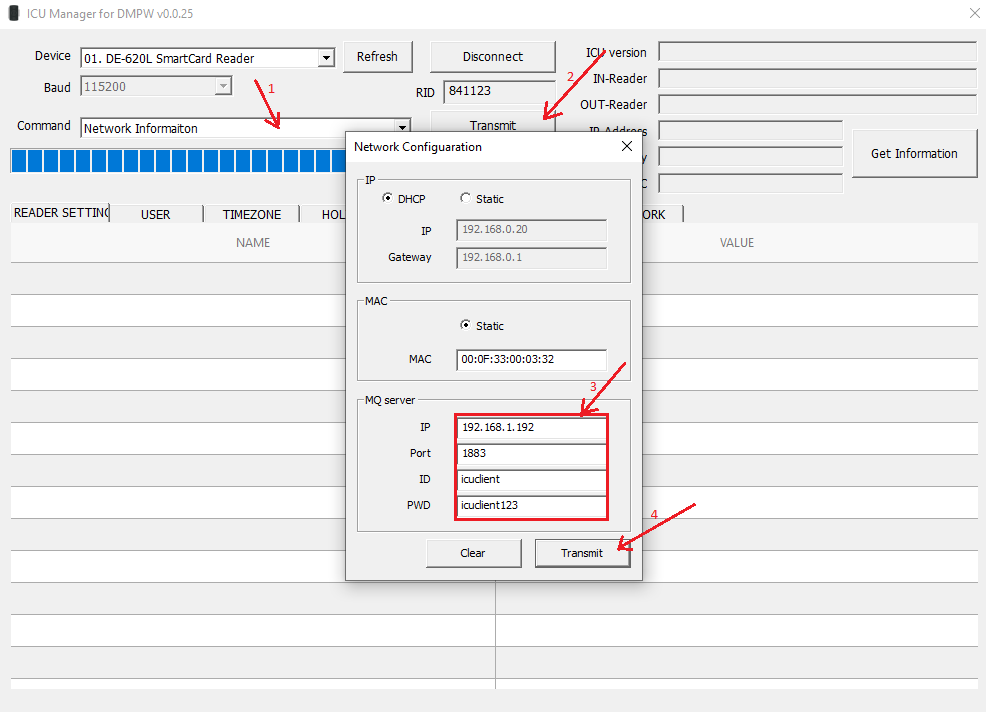
Step 4: Config network device to your IP. Select Command 'Network Information' then click 'Transmit'. It will show Modal config, in this modal enter your information of your IP, port, (ID, PWD) is account of mqtt. After update information config click 'Transmit' to save config.
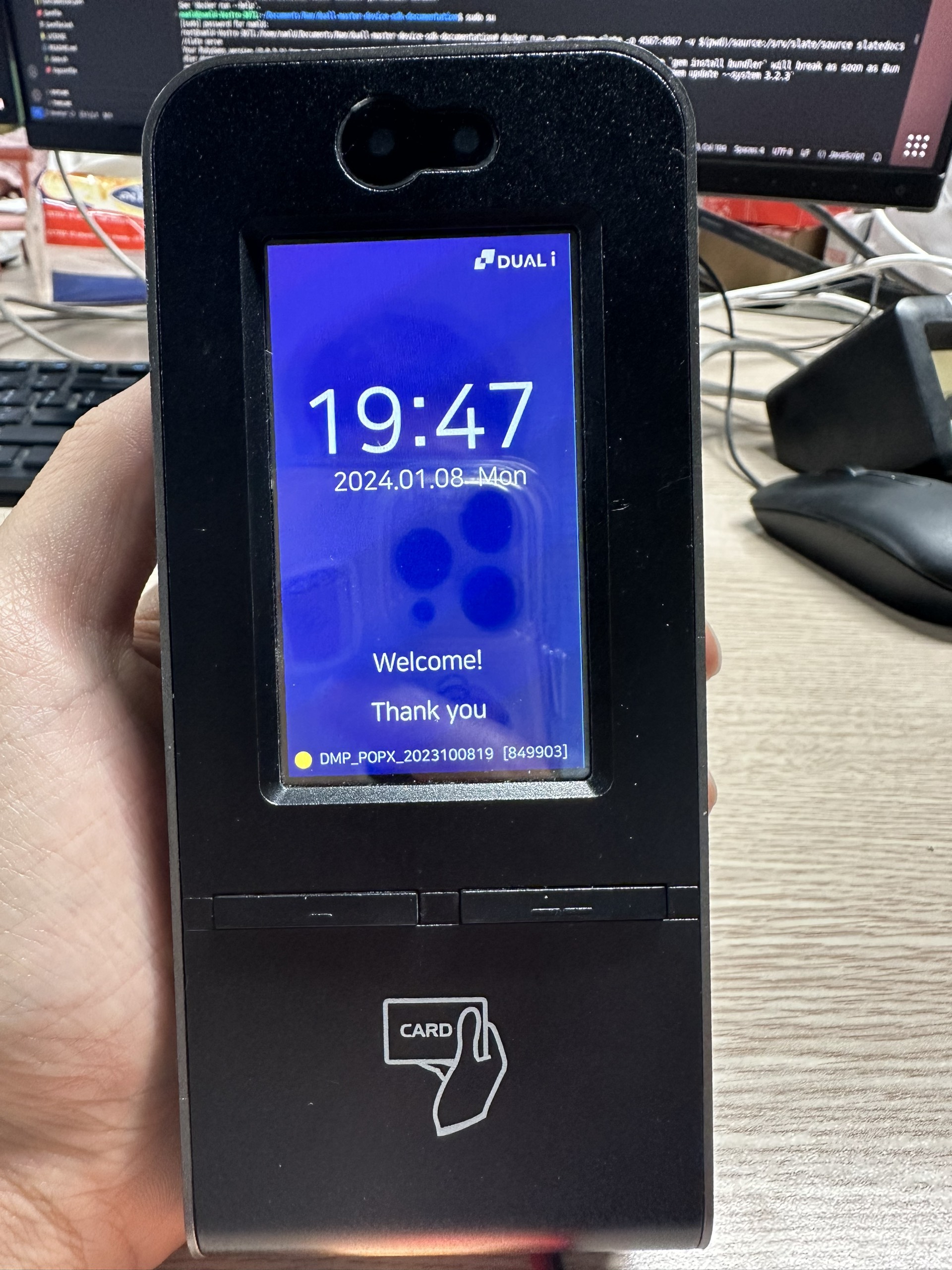
POPX
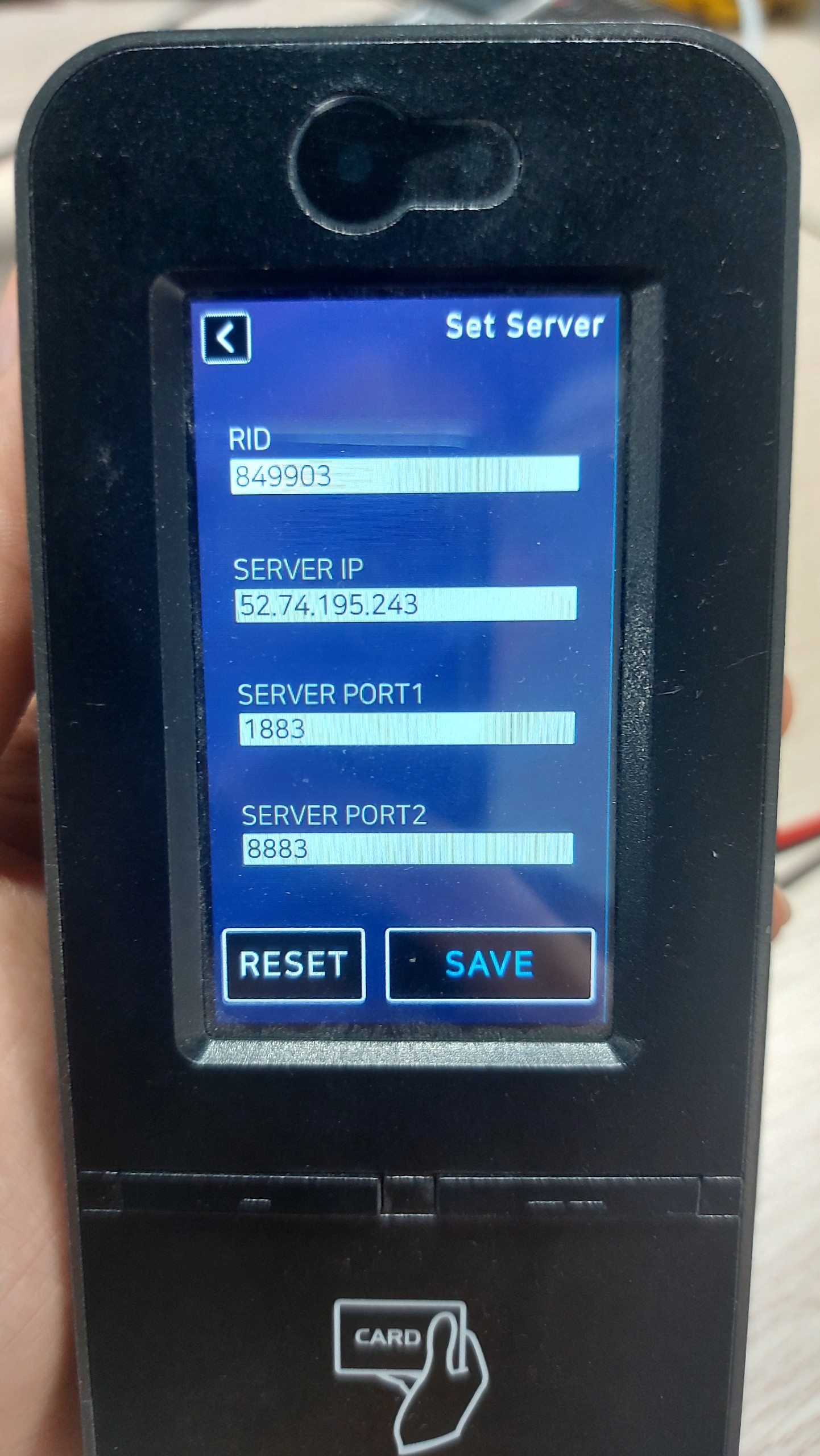
Step 1: Connect network to device then double click to button left.
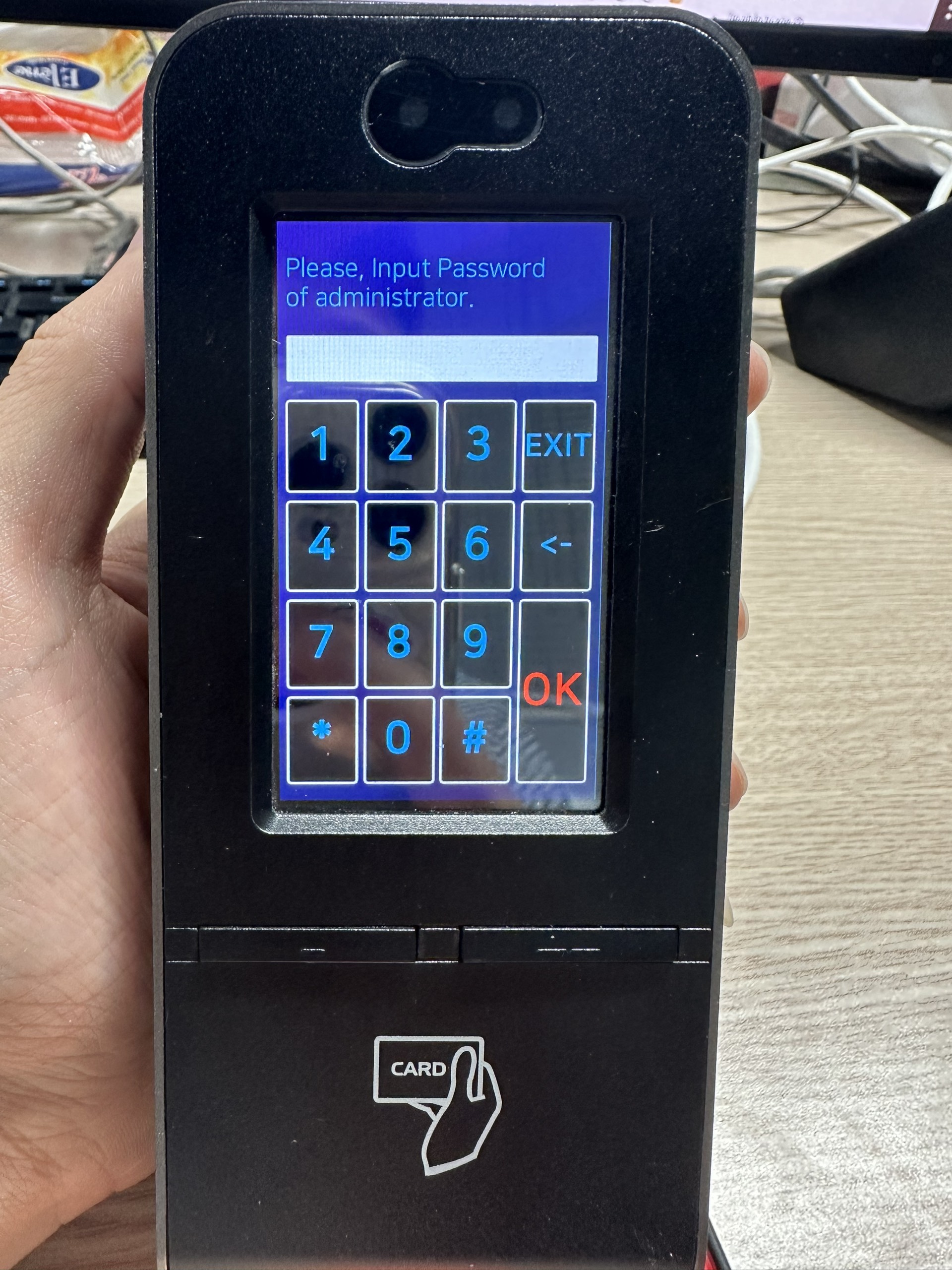
Step 2: Enter Password of administrator end click 'OK'.
Step 3: In main monitor, click 'Server'.
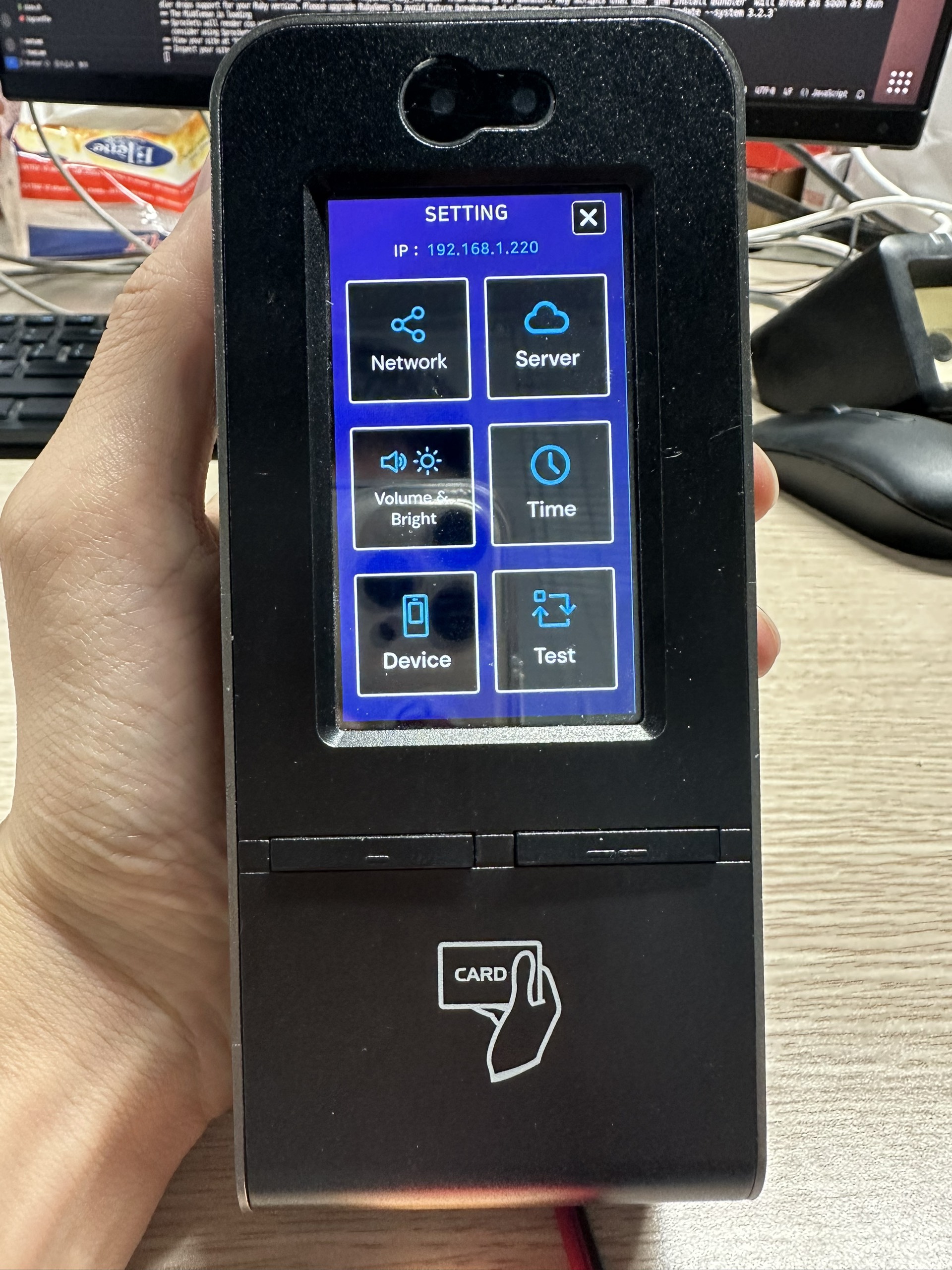
Step 4: Enter RID, your computer IP, MQTT port then click 'SAVE' to save infor config of device.
RA08
Step 1: Connect network to device by WIFI or LAN.
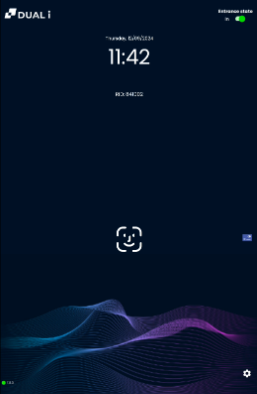
Step 2: Click to icon setting from Home Screen.
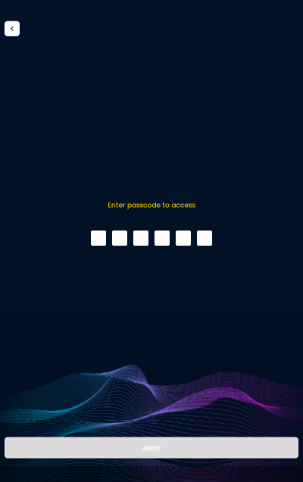
Step 3: Enter password *#0074, then click button Apply.
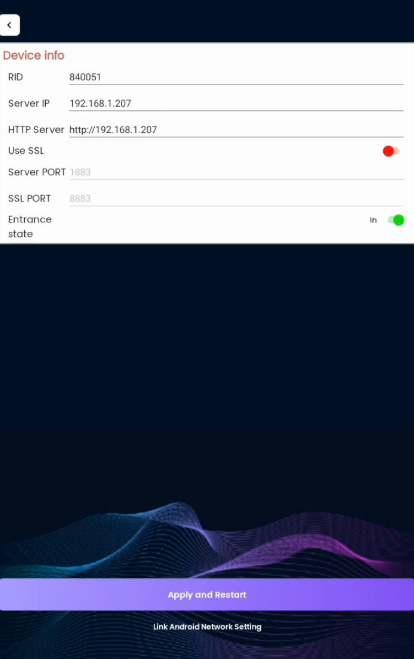
Step 4: Choose Device Info and set some params:
- RID: Device Address (Ex: 840051)
- Server IP: IP Address of your server (Ex: 192.168.1.207)
- HTTP Server: Url of your service (Ex: http://192.168.1.207:5000)
Then click "Apply and Restart"
Live demo
- Open the file
demo_sdk.htmllocated in thelive_demo_localfolder, and follow the instructions provided on this page.
APIs
Login
# replace your username and password token  to $username and $password
curl -X POST "http://localhost:5000/login" -H  "accept: application/octet-stream" -H  "Content-Type: application/json" -d "{\"username\":\"$username\",\"password\":\"$password\"}"
function login() {
    const username = $('#usernameInput').val();
    const password = $('#passwordInput').val();

    const storedApiUrl = localStorage.getItem('apiUrl');
    const apiUrlWithoutQuotes = storedApiUrl ? storedApiUrl.replace(/^"(.*)"$/, '$1') : '';

    const data = {
        username: username,
        password: password
    };

    fetch(apiUrlWithoutQuotes + "/login", {
        method: 'POST',
        headers: {
            'Content-Type': 'application/json'
        },
        body: JSON.stringify(data)
    })
        .then(function(response) {
            return response.json();
        })
        .then(function(data) {
            console.log(data);
            // save data in Local Storage
            if (data.errors && data.errors.length > 0) {
                alert('Login failed: ' + data.errors.map(function(x) {
                    return x.message;
                }));
            } else {
                localStorage.setItem('authToken', data.authToken);
                localStorage.setItem('fullName', data.fullName);
                localStorage.setItem('refreshToken', data.refreshToken);
                console.log('Data received:', data);
                alert('Login successfully');
            }
        })
        .catch(function(error) {
            alert('Error login:', error);
        });
}
Successful api returns like this example:
{
  "status": 1,
  "authToken": "eyJhbGciOiJIUzeyJhbGciOiJIUzeyJhbGciOiJIUzeyJhbGciOiJIUz",
  "refreshToken": "eyJhbGciOiJIUzeyJhbGciOiJIUzeyJhbGciOiJIUzeyJhbGciOiJIUz",
  "fullName": "abc",
  "expireAccessToken": 300
}
The failed api returns like this example:
{
  "statusCode": 1002,
  "message": "Email or Password is invalid.",
  "errors": [
    {
      "field": null,
      "message": "Email or Password is invalid."
    }
  ]
}
This API to login
HTTP Request
POST http://localhost:5000/login
URL Parameters
| Parameter | Type | Description |
|---|---|---|
| username | string | The user name to login |
| password | string | The password |
Refresh Token
# replace your token and refresh token  to $refreshToken and $expiredToken
curl -X POST "http://localhost:5000/refreshToken?refreshToken=$refreshToken&expiredToken=$expiredToken" -H  "accept: application/octet-stream" -d ""
function refreshToken() {
    const refreshToken = $('#refreshTokenInput').val();
    const expiredToken = $('#expiredTokenInput').val();

    const storedApiUrl = localStorage.getItem('apiUrl');
    const apiUrlWithoutQuotes = storedApiUrl ? storedApiUrl.replace(/^"(.*)"$/, '$1') : '';

    fetch(apiUrlWithoutQuotes + "/refreshToken?refreshToken="+ refreshToken + "&expiredToken=" + expiredToken, {
        method: 'POST',
        headers: {
            'Content-Type': 'application/json'
        },
    })
        .then(function(response) {
            return response.json();
        })
        .then(function(data) {
            console.log(data);
            // save data in Local Storage
            if (data.data && data.data.length > 0) {
                localStorage.setItem('authToken', data.data.authToken);
                localStorage.setItem('fullName', data.data.fullName);
                localStorage.setItem('refreshToken', data.data.refreshToken);
                console.log('Data received:', data.data);
                alert('Refresh token successfully');
            }
        })
        .catch(function(error) {
            alert('Error refresh token:', error);
        });
}
Successful api returns like this example:
{
    "message": "Refresh Token Success",
    "statusCode": true,
    "data": {
    "status": 1,
    "authToken": "eyJhbGciOiJIUzI2OTeyJhbGciOiJIUzI2OTeyJhbGciOiJIUzI2OTeyJhbGciOiJIUzI2OT",
    "refreshToken": "eyJhbGciOiJIUzI1NMeyJhbGciOiJIUzI2OTeyJhbGciOiJIUzI2OTeyJhbGciOiJIUzI2OT",
    "fullName": "admin",
    "expireAccessToken": 300
    }
}
The failed api returns like this example:
{
    "statusCode": 1003,
    "message": "Invalid token.",
    "errors": [
        {
            "field": null,
            "message": "Invalid token."
        }
    ]
}
This API to refresh token
HTTP Request
POST http://localhost:5000/refreshToken
URL Parameters
| Parameter | Type | Description |
|---|---|---|
| refreshToken | string | The token when user login |
| expiredToken | string | The refresh token when user login |
Event-log real time
# replace your url api to @yourUrlApi
curl -X POST "http://localhost:5000/device/event-log" -H  "accept: application/octet-stream" -H  "Content-Type: application/json" -d "{\"url\":\"@yourUrlApi\"}"
function sendUrlReciveEventLog(){
    localStorage.setItem('apiUrlEvent', apiUrl);

    const storedApiUrl = localStorage.getItem('apiUrl');
    const apiUrlWithoutQuotes = storedApiUrl ? storedApiUrl.replace(/^"(.*)"$/, '$1') : '';

    const data = { url: apiUrl };

    fetch(apiUrlWithoutQuotes + '/device/event-log', {
        method: 'POST',
        headers: {
            'Content-Type': 'application/json',
        },
        body: JSON.stringify(data)
    })
        .then(function(response) {
            if (response.ok) {
                alert('Send URL to receive events success.');
            } else {
                throw new Error('Error sending URL to receive events');
            }
        })
        .catch(function(error) {
            console.error(error);
        });
}
The JSON request send to api:
{
    "url":"http://localhost:3000/revice-event-log"
}
The url api (param of your api) must be is method POST and have [Frombody] is format:
{
    "total" : 1,
    "events" : [
        {
            "deviceAddress" : "840000",
            "accessTime" : "09102023162308",
            "cardId" : "B50AHFDDFFF",
            "issueCount" : 0,
            "userId": 123,
            "userName" : "",
            "updateTime" : "09102023162308308000",
            "inOut" : "In",
            "eventType" : 9,
            "idType" : 0
        }
    ],
    "utcHour" : 7,
    "utcMinute" : 0
}
Send url of your api then we will send event logs real time to this api.
HTTP Request
POST http://localhost:5000/device/event-log
Door Status real time
# replace your url api to @yourUrlApi
curl -X POST "http://localhost:5000/device/door-status" -H  "accept: application/octet-stream" -H  "Content-Type: application/json" -d "{\"url\":\"@yourUrlApi\"}"
function saveApiUrlDoorStatus() {
    const urlReceiveDoorStatusInput = document.getElementById('urlReceiveDoorStatusInput');
    const urlReceiveDoorStatus = urlReceiveDoorStatusInput.value;

    if (urlReceiveDoorStatus) {
        // Save data in Local Storage
        localStorage.setItem('urlReceiveDoorStatus',urlReceiveDoorStatus);

        const accessToken = localStorage.getItem('authToken');
        const storedApiUrl = localStorage.getItem('apiUrl');
        const apiUrlWithoutQuotes = storedApiUrl ? storedApiUrl.replace(/^"(.*)"$/, '$1') : '';

        const data = { url: urlReceiveDoorStatus };

        fetch(apiUrlWithoutQuotes + '/device/door-status', {
            method: 'POST',
            headers: {
                'Content-Type': 'application/json',
                'Authorization': 'Bearer ' + accessToken
            },
            body: JSON.stringify(data)
        })
            .then(function(response) {
                if (response.ok) {
                } else {
                    throw new Error('Error sending URL to receive door status');
                }
            })
            .catch(function(error) {
                console.error(error);
            });

    } else {
    }
}
The JSON request send to your api:
{
    "url":"http://localhost:3000/revice-door-status"
}
The url api (param of your api) must be is method POST and have [Frombody] is format:
{
    "deviceAddress" : "840000",
    "doorState" : 8,
}
Send url of your api then we will send door status real time to this api.
HTTP Request
POST http://localhost:5000/device/door-status
Note:
doorState:
- 0 : Closed & Lock
- 1 : Closed & Unlocked
- 2 : Opened
- 3 : Fored Opened
- 4 : Passage Opened
- 5 : Emergency Opened
- 6 : Emergency Closed
- 7 : Unknown
- 8 : Lock
- 9 : Unlock
- 10 : Inactive
- 11 : Need Setting
- 12 : Invalid
- 200 : Fire
- 201 : NoFire
- 120 : NoMealTime
Get List Event-log
curl -X GET "http://localhost:5000/device/event-recovery?deviceAddress=$deviceAddress&accessDateFrom=$accessFrom&accessDateTo=$accessTo" -H "accept: application/octet-stream" -H "Authorization: bearer $accesstoken"
function getListEventLog() {
    var accessFrom = $('#accessFrom').val().trim();
    var accessTo = $('#accessTo').val().trim();
    var isValidAccessFrom = moment(accessFrom, 'DD/MM/YYYY HH:mm:ss', true).isValid();
    var isValidAccessTo = moment(accessTo, 'DD/MM/YYYY HH:mm:ss', true).isValid();

    if (isValidAccessFrom && isValidAccessTo) {
        accessFrom = moment(accessFrom, 'DD/MM/YYYY HH:mm:ss').format('DDMMYYYYHHmmss');
        accessTo = moment(accessTo, 'DD/MM/YYYY HH:mm:ss').format('DDMMYYYYHHmmss');
        const accessToken = localStorage.getItem('authToken');

        const deviceAddress = localStorage.getItem('deviceAddress');
        const storedApiUrl = localStorage.getItem('apiUrl');
        const apiUrlWithoutQuotes = storedApiUrl ? storedApiUrl.replace(/^"(.*)"$/, '$1') : '';

        fetch(apiUrlWithoutQuotes + "/device/event-recovery?deviceAddress=" + deviceAddress +
            "&accessDateFrom="+ accessFrom +"&accessDateTo="+ accessTo, {
            method: 'GET',
            headers: {
                'Content-Type': 'application/json',
                'Authorization': 'Bearer ' + accessToken
            },
        })
            .then(function(response) {
                return response.json();
            })
            .then(function(data) {
                console.log(data);
                if (data.errors && data.errors.length > 0) {
                    alert('Get list event log failed: ' + data.errors.map(function(x) {
                        return x.message;
                    }));
                } else {
                    console.log('Data EventLog:', data);
                    updateTableAllEventLog(data);
                }
            })
            .catch(function(error) {
            });
    } else {
        alert("Please enter date time format: dd/mm/yyyy HH:mm:ss");
    }
}
Successful api returns like this example:
[
  {
    "frameIndex": 0,
    "totalIndex": 7,
    "processId": "3f8b6cc6-460b-4b3a-b0be-5d5dcf6ac812",
    "total": 20,
    "utcHour": 7,
    "utcMinute": 0,
    "events": [
      {
        "accessTime": "04012024111232",
        "cardId": "B50A452D",
        "issueCount": 0,
        "userName": null,
        "updateTime": "10012024165101",
        "inOut": "Out",
        "eventType": 9,
        "idType": 0,
        "temperature": 0
      }
    ]
  },
  {
    "frameIndex": 1,
    "totalIndex": 7,
    "processId": "3f8b6cc6-460b-4b3a-b0be-5d5dcf6ac812",
    "total": 20,
    "utcHour": 7,
    "utcMinute": 0,
    "events": [
      {
        "accessTime": "04012024143602",
        "cardId": "",
        "issueCount": 0,
        "userName": null,
        "updateTime": "10012024165101",
        "inOut": null,
        "eventType": 37,
        "idType": 0,
        "temperature": 0
      }
    ]
  }
]
The failed api returns like this example:
{
    "statusCode": 400,
    "message": "message",
    "errors": [
        {
            "field": "",
            "message": "message"
        }
    ]
}
This api to get list event log from accessTimeFrom to accessTimeTo of device by device address
HTTP Request
GET http://localhost:5000/device/event-recovery?deviceAddress=$deviceAddress&accessDateFrom=$accessFrom&accessDateTo=$accessTo
URL Parameters
| Parameter | Type | Description |
|---|---|---|
| deviceAddress | string | The device address of device. |
| accessDateFrom | string | This is accessFrom with format DDMMyyyyHHmmss (ex: 01012024000000) |
| accessDateTo | string | This is accessTo with format DDMMyyyyHHmmss (ex: 01012024000000) |
Get device infor
# replace your deviceAddress, sender and token to $deviceAddress, $sender and $yourToken
curl -X GET "http://localhost:5000/device/get-device-infor?deviceAddress=$deviceAddress&sender=$sender" -H  "accept: application/octet-stream" -H  "Authorization: bearer $yourToken"
function getDeviceInfor() {
    const accessToken = localStorage.getItem('authToken');
    const storedApiUrl = localStorage.getItem('apiUrl');
    const deviceAddress = localStorage.getItem('deviceAddress');
    const apiUrlWithoutQuotes = storedApiUrl ? storedApiUrl.replace(/^"(.*)"$/, '$1') : '';
    // sender is name of user send request to device.
    fetch(apiUrlWithoutQuotes + '/device/get-device-infor?deviceAddress=' + deviceAddress + '&sender=' + sender, {
        method: 'GET',
        headers: {
            'Content-Type': 'application/json',
            'Authorization': 'Bearer ' + accessToken
        }
    })
        .then(function(response) {
            return response.json();
        })
        .then(function(data) {
            if (data.errors && data.errors.length > 0) {
                alert('Get device infor failed: ' + data.errors.map(function(error) {
                    return error.message;
                }).join(', '));
            } else {
                // display data device infor
                outputJsonEditor.setValue(JSON.stringify(data, null, 2));
            }
        })
        .catch(function(error) {
            alert('Error get device infor:', error);
        });
}
Successful api returns like this example:
{
    "deviceAddress": "123456",
    "macAddress": "00:0F:33:00:00:00",
    "version": "ICU-300N_DMPW_0.0.11",
    "reader0Version": "DQ-MINI_DMPW_201215", // inCardReader
    "reader1Version": "DQ-MINI_DMPW_201216", // outCardReader
    "nfcModuleVersion": "",
    "extraVersion": "",
    "ipAddress": "100.100.1.10",
    "subnet": "255.255.255.0",
    "gateway": "100.100.1.1",
    "serverIp": "100.100.1.10",
    "serverPort": "1883",
    "deviceTime": "04102023093854",
    "eventCount": 724, // total event stored in device
    "userCount": 813, // total user stored in device
    "eventNotTransCount": 0,
    "operationMode": 0,
    "integratedDevices": [
            {
            "type" : "HANET_CAMERA",
            "id": "$camera_id",
            "role" : 0
        },
        {
            "type" : "HANET_CAMERA",
            "id": "$camera_id",
            "role" : 1
        }
    ]
}
The failed api returns like this example:
{
    "statusCode": 400,
    "message": "message",
    "errors": [
        {
            "field": "",
            "message": "message"
        }
    ]
}
This api to get information of device by device address
HTTP Request
GET http://localhost:5000/device/get-device-infor?deviceAddress=$deviceAddress&sender=$sender
URL Parameters
| Parameter | Type | Description |
|---|---|---|
| deviceAddress | string | The device address of device you wanna get information |
| sender | string | This is the name of the sender requesting to retrieve device information |
Note:
operationMode:
- 0: entrance
- 1: restaurant
- 2: bus reader
- 3: Fire detector
role
- 0: out
- 1: in
Get device config
# replace your deviceAddress, sender and token to $deviceAddress, $sender and $yourToken
curl -X GET "http://localhost:5000/device/get-device-config?deviceAddress=$deviceAddress&sender=$sender" -H  "accept: application/octet-stream" -H  "Authorization: bearer $yourToken"
function getDeviceConfig() {
    const accessToken = localStorage.getItem('authToken');
    const storedApiUrl = localStorage.getItem('apiUrl');
    const deviceAddress = localStorage.getItem('deviceAddress');
    const apiUrlWithoutQuotes = storedApiUrl ? storedApiUrl.replace(/^"(.*)"$/, '$1') : '';
    // sender is name of user send request to device.
    fetch(apiUrlWithoutQuotes + '/device/get-device-config?deviceAddress=' + deviceAddress + '&sender=' + sender, {
        method: 'GET',
        headers: {
            'Content-Type': 'application/json',
            'Authorization': 'Bearer ' + accessToken
        }
    })
        .then(function(response) {
            return response.json();
        })
        .then(function(data) {
            if (data.errors && data.errors.length > 0) {
                alert('Get device Config failed: ' + data.errors.map(function(error) {
                    return error.message;
                }).join(', '));
            } else {
                // display data device config
                outputDeviceConfigJsonEditor.setValue(JSON.stringify(data, null, 2));
            }
        })
        .catch(function(error) {
            alert('Error get device Config:', error);
        });

}
Successful api returns like this example:
{
    "readerCount": 2,
    "readerConfig":[7, 0],  // [reader0, reader1, ...]
                            // bit1 - led. 0: blue, 1: red
                            // bit2 - buzzer. 0: on, 1: off
                            // bit0 - inout. 0: in, 1: out
    "verifyMode":1,
    "activeTimezone":0,
    "passageTimezone":1,
    "lockOpenDuration":100, // seconds
    "closeReverseLockFlag":false,
    "valid":0,              // 0: valid, 1: invalid
    "antiPassback":0,       // 0: not use, 1: soft, 2: hard
    "sensorDuration":100,
    "mprCount":1,
    "mprInterval":30,
    "backupPeriod":3,
    "doorSensorType":1,     // 0: normal opened, 1: normal closed, 2: not use
    "sensorAlarm":false,
    "ipAddress":"%s",
    "serverPort":"",
    "serverIp":"",
    "cardCount": 256
}
The failed api returns like this example:
{
    "statusCode": 400,
    "message": "message",
    "errors": [
        {
            "field": "",
            "message": "message"
        }
    ]
}
This api to get config of device by device address
HTTP Request
GET http://localhost:5000/device/get-device-config?deviceAddress=$deviceAddress&sender=$sender
URL Parameters
| Parameter | Type | Description |
|---|---|---|
| deviceAddress | string | The device address of device you wanna get config |
| sender | string | This is the name of the sender requesting to retrieve device config |
Note:
roleReader:
- 0: in
- 1: out
deviceBuzzer:
- 0: on
- 1: off
verifyMode:
- 1: Card
- 2: QR
- 3: Face
- 9: PassCode
- 12: CardAndQR
- 19: CardAndPassCode
- 20: FingerprintOnly
- 21: CardOrFingerprint
- 33: VNID
- 24: CardOrQrOrFingerprintOrFaceId
- 120: CardOrQR
- 190: CardOrPassCode
- 340: FaceOrIris
- 1290: CardOrQROrPassCode
- 1340: CardOrFaceOrIris
antiPassback:
- 0: not use
- 1: soft
- 2: hard
doorSensorType:
- 0: normal opened
- 1: normal closed
- 2: not use
valid:
- 0: valid
- 1: invalid
Set device config
# replace your deviceAddress, sender and token to $deviceAddress, $sender and $yourToken
curl -X POST "http://localhost:5000/device/update-device-config?deviceAddress=$deviceAddress&sender=$sender" -H  "accept: application/octet-stream" -H  "Authorization: bearer $yourToken" -H  "Content-Type: application/json" -d "{\"readerCount\":0,\"readerConfig\":[0],\"verifyMode\":0,\"activeTimezone\":0,\"passageTimezone\":0,\"lockOpenDuration\":0,\"closeReverseLockFlag\":true,\"valid\":0,\"antiPassback\":0,\"sensorAlarm\":true,\"sensorDuration\":0,\"mprCount\":0,\"mprInterval\":0,\"backupPeriod\":0,\"doorSensorType\":0,\"qrAesKey\":\"string\",\"deviceBuzzer\":0,\"cameras\":[{\"cameraId\":\"string\",\"roleReader\":0,\"saveEventUnknownFace\":true}],\"operationMode\":0}"
function sendSetDeviceConfig() {
    const accessToken = localStorage.getItem('authToken');
    // get data input of your config
    const jsonData = inputSetDeviceConfigJsonEditor.getValue();
    const storedApiUrl = localStorage.getItem('apiUrl');
    const deviceAddress = localStorage.getItem('deviceAddress');
    const apiUrlWithoutQuotes = storedApiUrl ? storedApiUrl.replace(/^"(.*)"$/, '$1') : '';
    const data = JSON.parse(jsonData);
    fetch(apiUrlWithoutQuotes + '/device/update-device-config?deviceAddress='+deviceAddress+'&sender='+sender, {
        method: 'POST',
        headers: {
            'Content-Type': 'application/json',
            'Authorization': 'Bearer ' + accessToken
        },
        body: JSON.stringify(data)
    })
        .then(function(response) {
            return response.json();
        })
        .then(function(responseData) {
            if (responseData.errors && responseData.errors.length > 0) {
                alert('Set device Config failed: ' + responseData.errors.map(function(error) {
                    return error.message;
                }).join(', '));
            } else {
                outputSetDeviceConfigJsonEditor.setValue(JSON.stringify(responseData, null, 2));
            }
        })
        .catch(function(error) {
            alert('Error set device Config:', error);
        });

}
Successful api returns like this example:
{
    "status": "Success"
}
The failed api returns like this example:
{
    "statusCode": 400,
    "message": "message",
    "errors": [
        {
            "field": "",
            "message": "message"
        }
    ]
}
This api to set config of device by device address
HTTP Request
POST http://localhost:5000/device/update-device-config?deviceAddress=$deviceAddress&sender=$sender
URL Parameters
The JSON request send to api:
{
    "readerCount" : 1,
    "readerConfig" : [ 6 ],  // [reader0, reader1, ...]
                             // bit0 - inout. 0: in, 1: out
                             // bit1 - led. 0: blue, 1: red
                             // bit2 - buzzer. 0: off, 1: on
    "verifyMode" : 2,
    "activeTimezone" : 1,
    "passageTimezone" : 0,
    "lockOpenDuration" : 30, // seconds
    "closeReverseLockFlag" : false,
    "valid" : 0,              // 0: valid, 1: invalid
    "antiPassback" : 0,       // 0: not use, 1: soft, 2: hard
    "sensorAlarm" : false,
    "sensorDuration" : 1,
    "mprCount" : 1,
    "mprInterval" : 60,
    "backupPeriod" : 3,
    "doorSensorType" : 2,     // 0: normal opened, 1: normal closed, 2: Not use
    "qrAesKey" : "3437696C61754457504D44696C6175448354FE0B0D83C204FE140F53AC2DB8C548ACB6C5A17BE5AA8095B6D55F664A14", // qr aes key for dynamic qr
    "deviceBuzzer" : 1,       // 0: off, 1: on
    "cameras" : [ ],
    "operationMode" : 0,      // 0: entrance, 1: restaurant, 2: bus reader, 3: Fire detector
    "companyCode" : "g078536",
    "bioStationMode" : 0,
    "useStaticQrCode" : true,
    "roleReader":0
}
This is data in model request
| Parameter | Type | Description |
|---|---|---|
| readerCount | int | The total reader of device |
| readerConfig | int[] |
Note (logic in readerConfig):
if Device type is (Icu300N or Icu300NX)
- readerCount = 2; (is total reader to connect in device)
item in readerConfig[]: (is config in reader of device)
- item1 = (role0 << 0) + (led0 << 1) + (buzzer0 <<2).
- item2 = (role1 << 0) + (led1 << 1) + (buzzer1 <<2).
if Device type is (ITouchPop or ITouchPopX or DQMiniPlus or IT100)
readerCount = 1 or 2
if readerCount = 1.
- readerConfig[] has 1 item with.
- item = (role0 << 0) + (led0 << 1) + (buzzer0 <<2).
if readerCount = 2.
- readerConfig[] has one more item with
- item = (role1 << 0) + (led1 << 1) + (buzzer1 <<2).
qrAesKey: EncryptSecretCode use aes key with CipherMode is CBC.
roleReader:
- 0: in
- 1: out
deviceBuzzer:
- 0: on
- 1: off
verifyMode:
- 1: Card
- 2: QR
- 3: Face
- 9: PassCode
- 12: CardAndQR
- 19: CardAndPassCode
- 20: FingerprintOnly
- 21: CardOrFingerprint
- 33: VNID
- 120: CardOrQR
- 190: CardOrPassCode
- 340: FaceOrIris
- 1290: CardOrQROrPassCode
- 1340: CardOrFaceOrIris
antiPassback:
- 0: not use
- 1: soft
- 2: hard
doorSensorType:
- 0: normal opened
- 1: normal closed
- 2: not use
valid:
- 0: valid
- 1: invalid
Set current time
# replace your deviceAddress, sender, timezone and token to $deviceAddress, $sender, $timezone and $yourToken
curl -X POST "http://localhost:5000/device/set-current-time?deviceAddress=$deviceAddress&sender=$sender&timeZone=$timezone" -H  "accept: application/octet-stream" -H  "Authorization: bearer $yourToken" -d ""
function sendSetDeviceCurrentTime() {
    const accessToken = localStorage.getItem('authToken');
    const jsonData = inputDeviceCurrentTimeJsonEditor.getValue();
    const storedApiUrl = localStorage.getItem('apiUrl');
    const deviceAddress = localStorage.getItem('deviceAddress');
    const apiUrlWithoutQuotes = storedApiUrl ? storedApiUrl.replace(/^"(.*)"$/, '$1') : '';
    const data = JSON.parse(jsonData);
    console.log(data);
    fetch(apiUrlWithoutQuotes + '/device/set-current-time?deviceAddress='+deviceAddress+'&sender='+sender+'&timeZone='+data.timezone, {
        method: 'POST',
        headers: {
            'Content-Type': 'application/json',
            'Authorization': 'Bearer ' + accessToken
        },
    })
        .then(function(response) {
            return response.json();
        })
        .then(function(responseData) {
            if (responseData.errors && responseData.errors.length > 0) {
                alert('Set device CurrentTime failed: ' + responseData.errors.map(function(error) {
                    return error.message;
                }).join(', '));
            } else {
                outputDeviceCurrentTimeJsonEditor.setValue(JSON.stringify(responseData, null, 2));
            }
        })
        .catch(function(error) {
            alert('Error set device CurrentTime:', error);
        });

}
Successful api returns like this example:
{
    "deviceAddress": "840003",
    "doorStatus": "",
    "status": "Success"
}
The failed api returns like this example:
{
    "statusCode": 400,
    "message": "message",
    "errors": [
        {
            "field": "",
            "message": "message"
        }
    ]
}
The JSON request send to api:
{
    "timezone":"Asia/Ho_Chi_Minh"
}
This api to set current time of device by device address
HTTP Request
POST http://localhost:5000/device/set-current-time?deviceAddress=$deviceAddress&sender=$sender&timeZone=$timezone
URL Parameters
| Parameter | Type | Description |
|---|---|---|
| deviceAddress | string | The device address of device you wanna set current time |
| sender | string | This is the name of the sender requesting. |
Get cards information
# replace your deviceAddress, sender, cardId and token to $deviceAddress, $sender, $cardId and $yourToken
curl -X GET "http://localhost:5000/device/get-card?deviceAddress=$deviceAddress&sender=$sender&cardId=$cardId" -H  "accept: application/octet-stream" -H  "Authorization: bearer $yourToken"
// get card by Id
function sendGetCardById() {
    const accessToken = localStorage.getItem('authToken');
    const jsonData = inputGetCardByIdJsonEditor.getValue();
    const storedApiUrl = localStorage.getItem('apiUrl');
    const deviceAddress = localStorage.getItem('deviceAddress');
    const apiUrlWithoutQuotes = storedApiUrl ? storedApiUrl.replace(/^"(.*)"$/, '$1') : '';
    const data = JSON.parse(jsonData);
    fetch(apiUrlWithoutQuotes+"/device/get-card?deviceAddress="+deviceAddress+"&sender="+sender+"&cardId="+data.cardId, {
        method: 'GET',
        headers: {
            'Content-Type': 'application/json',
            'Authorization': 'Bearer '+accessToken
        }
    })
        .then(function(response) {
            return response.json();
        })
        .then(function(responseData) {
            if (responseData.errors && responseData.errors.length > 0) {
                alert('Get card by Id '+data.cardId+' failed: ' + responseData.errors.map(function(error) {
                    return error.message;
                }).join(', '));
            } else {
                outputGetcardByIdJsonEditor.setValue(JSON.stringify(responseData, null, 2));
            }
        })
        .catch(function(error) {
            alert('Error Get card by Id: '+data.cardId, error);
        });

}
// get all card infor
function sendGetAllCard() {
    const accessToken = localStorage.getItem('authToken');
    const storedApiUrl = localStorage.getItem('apiUrl');
    const deviceAddress = localStorage.getItem('deviceAddress');
    const apiUrlWithoutQuotes = storedApiUrl ? storedApiUrl.replace(/^"(.*)"$/, '$1') : '';
    fetch(apiUrlWithoutQuotes+"/device/get-all-card?deviceAddress="+deviceAddress+"&sender="+sender, {
        method: 'GET',
        headers: {
            'Content-Type': 'application/json',
            'Authorization': 'Bearer '+accessToken
        }
    })
        .then(function(response) {
            return response.json();
        })
        .then(function(responseData) {
            if (responseData.errors && responseData.errors.length > 0) {
                alert('Get all card failed: ' + responseData.errors.map(function(error) {
                    return error.message;
                }).join(', '));
            } else {
                outputGetAllCardJsonEditor.setValue(JSON.stringify(responseData, null, 2));
            }
        })
        .catch(function(error) {
            alert('Error Get all card: ', error);
        });

    }
Successful api returns like this example:
{
    "frameIndex": 0,
    "totalIndex": 0,
    "total": 1,
    "users": [
        {
        "employeeNumber": "",
        "departmentName": "",
        "userName": null,
        "cardId": "123112211212",
        "expireDate": "31122099",
        "effectiveDate": "10062023",
        "issueCount": 1,
        "adminFlag": 0,
        "cardStatus": 1,
        "timezone": 1,
        "userId": "6430",
        "idType": 0
        }
    ]
}
The failed api returns like this example:
{
    "statusCode": 400,
    "message": "message",
    "errors": [
        {
            "field": "",
            "message": "message"
        }
    ]
}
This api to get cards information of device by device address and cardId.
If cardId is null or empty, api will get all cards information in device by device address.
HTTP Request
GET http://localhost:5000/device/get-card?deviceAddress=$deviceAddress&sender=$sender&cardId=$cardId
URL Parameters
| Parameter | Type | Description |
|---|---|---|
| deviceAddress | string | The device address of device you wanna get cards information. |
| sender | string | This is the name of the sender requesting. |
| cardId | string | This is cardId. |
Note:
IdType:
- 0: NFC
- 1: QrCode
- 2: PassCode
- 3: NFCPhone
- 4: FaceId
- 5: HFaceId
- 6: VehicleId
- 7: Vein
- 8: FingerPrint
- 9: LFaceId
- 15: VNID
CardStatus:
- 0: Normal
- 1: Transfer
- 2: Retire
- 3: Lost
- 4: InValid
- 5: WaitingForPrinting
- 6: WaitingForIssuance
adminFlag:
- 0: not master card
- 1: is master card
timeZone: is time zone position
Add card information
# replace your deviceAddress, sender and token to $deviceAddress, $sender and $yourToken
curl -X POST "http://localhost:5000/device/add-card?deviceAddress=$deviceAddress&sender=$sender" -H  "accept: application/octet-stream" -H  "Authorization: bearer $yourToken" -H  "Content-Type: application/json" -d "[{\"employeeNumber\":\"888\",\"departmentName\":\"NhanSu\",\"userName\":\"Nguyen Van A\",\"cardId\":\"888\",\"expireDate\":\"31122099\",\"effectiveDate\":\"10062023\",\"issueCount\":1,\"adminFlag\":0,\"cardStatus\":1,\"timezone\":1,\"userId\":\"888\",\"idType\":0,\"antiPassBack\":0,\"password\":\"\",\"accessGroupId\":0,\"position\":\"\",\"avatar\":\"\",\"faceData\":null,\"floorIndex\":[],\"workType\":\"\",\"grade\":\"\",\"fingerTemplates\":[]}]"
function sendAddCard() {
    const accessToken = localStorage.getItem('authToken');
    const jsonData = inputAddCardJsonEditor.getValue();

    const storedApiUrl = localStorage.getItem('apiUrl');
    const deviceAddress = localStorage.getItem('deviceAddress');
    const apiUrlWithoutQuotes = storedApiUrl ? storedApiUrl.replace(/^"(.*)"$/, '$1') : '';

    const data = JSON.parse(jsonData);

    fetch(apiUrlWithoutQuotes+"/device/add-card?deviceAddress="+deviceAddress+"&sender="+sender, {
        method: 'POST',
        headers: {
            'Content-Type': 'application/json',
            'Authorization': 'Bearer '+accessToken
        },
        body: JSON.stringify([data])
    })
        .then(function(response) {
            return response.json();
        })
        .then(function(responseData) {
            if (responseData.errors && responseData.errors.length > 0) {
                alert('Add card failed: ' + responseData.errors.map(function(error) {
                    return error.message;
                }).join(', '));
                outputAddCardJsonEditor.setValue(JSON.stringify(responseData, null, 2));
            } else {
                outputAddCardJsonEditor.setValue(JSON.stringify(responseData, null, 2));
                alert('Send Add card success');
            }
        })
        .catch(function(error) {
            alert('Error add card: ', error);
        });

}
Successful api returns like this example:
{
    "total": 1,
    "users": [
        {
            "cardId": "123112211212"
        }
    ]
}
The failed api returns like this example:
{
    "statusCode": 400,
    "message": "message",
    "errors": [
        {
            "field": "",
            "message": "message"
        }
    ]
}
This api to add card information to device by device address.
HTTP Request
POST http://localhost:5000/device/add-card?deviceAddress=$deviceAddress&sender=$sender
URL Parameters
The JSON request send to api:
[
    {
        "employeeNumber": "888",
        "departmentName": "NhanSu",
        "userName": "Nguyen Van A",
        "cardId": "888",
        "expireDate": "31122099",
        "effectiveDate": "10062023",
        "issueCount": 1,
        "adminFlag": 0,
        "cardStatus": 1,
        "timezone": 1,
        "userId": "888",
        "idType": 0,
        "antiPassBack":0,
        "password" : "",
        "accessGroupId":0,
        "position" : "",
        "avatar" : "",
        "faceData": null,
        "floorIndex" : [],
        "workType" : "",
        "grade" : "",
        "fingerTemplates" : []
      }
]
| Parameter | Type | Description |
|---|---|---|
| deviceAddress | string | The device address of device. |
| sender | string | This is the name of the sender requesting. |
Note:
If you want to card type LFaceId, cardId have to set by format "M_{userId}"
IdType:
- 0: NFC
- 1: QrCode
- 2: PassCode
- 3: NFCPhone
- 4: FaceId
- 5: HFaceId
- 6: VehicleId
- 7: Vein
- 8: FingerPrint
- 9: LFaceId
- 15: VNID
CardStatus:
- 0: Normal
- 1: Transfer
- 2: Retire
- 3: Lost
- 4: InValid
- 5: WaitingForPrinting
- 6: WaitingForIssuance
adminFlag:
- 0: not master card
- 1: is master card
timeZone: is time zone position
workType:
- 0: PermanentWorker
- 1: ContractWorker
- 2: ResidentWorker
- 3: PartTimeWorker
- 4: ContractorStaff
- 5: Personnel
Delete card information
# replace your deviceAddress, sender and token to $deviceAddress, $sender and $yourToken
curl -X DELETE "http://localhost:5000/device/delete-card?deviceAddress=$deviceAddress&sender=$sender" -H  "accept: application/octet-stream" -H  "Authorization: bearer $yourToken" -H  "Content-Type: application/json" -d "[{\"employeeNumber\":\"888\",\"departmentName\":\"NhanSu\",\"userName\":\"Nguyen Van A\",\"cardId\":\"888\",\"expireDate\":\"31122099\",\"effectiveDate\":\"10062023\",\"issueCount\":1,\"adminFlag\":0,\"cardStatus\":1,\"timezone\":1,\"userId\":\"888\",\"idType\":0,\"antiPassBack\":0,\"password\":\"\",\"accessGroupId\":0,\"position\":\"\",\"avatar\":\"\",\"faceData\":null,\"floorIndex\":[],\"workType\":\"\",\"grade\":\"\",\"fingerTemplates\":[]}]"
function sendDeleteCard() {
    const accessToken = localStorage.getItem('authToken');
    const jsonData = inputDeleteCardJsonEditor.getValue();
    const storedApiUrl = localStorage.getItem('apiUrl');
    const deviceAddress = localStorage.getItem('deviceAddress');
    const apiUrlWithoutQuotes = storedApiUrl ? storedApiUrl.replace(/^"(.*)"$/, '$1') : '';
    const data = JSON.parse(jsonData);
    fetch(apiUrlWithoutQuotes+"/device/delete-card?deviceAddress="+deviceAddress+"&sender="+sender, {
        method: 'DELETE',
        headers: {
            'Content-Type': 'application/json',
            'Authorization': 'Bearer '+accessToken
        },
        body: JSON.stringify([data])
    })
        .then(function(response) {
            return response.json();
        })
        .then(function(responseData) {
            if (responseData.errors && responseData.errors.length > 0) {
                alert('Delete card failed: ' + responseData.errors.map(function(error) {
                    return error.message;
                }).join(', '));
                outputDeleteCardJsonEditor.setValue(JSON.stringify(responseData, null, 2));
            } else {
                outputDeleteCardJsonEditor.setValue(JSON.stringify(responseData, null, 2));
                alert('Send Delete card success');
            }
        })
        .catch(function(error) {
            alert('Error delete card: ', error);
        });

}
Successful api returns like this example:
{
    "total": 1,
    "users": [
        {
            "cardId": "123112211212"
        }
    ]
}
The failed api returns like this example:
{
    "statusCode": 400,
    "message": "message",
    "errors": [
        {
            "field": "",
            "message": "message"
        }
    ]
}
This api to delete card information to device by device address.
HTTP Request
DELETE http://localhost:5000/device/delete-card?deviceAddress=$deviceAddress&sender=$sender
URL Parameters
The JSON request send to api:
[
    {
        "employeeNumber": "888",
        "departmentName": "NhanSu",
        "userName": "Nguyen Van A",
        "cardId": "888",
        "expireDate": "31122099",
        "effectiveDate": "10062023",
        "issueCount": 1,
        "adminFlag": 0,
        "cardStatus": 1,
        "timezone": 1,
        "userId": "888",
        "idType": 0,
        "antiPassBack":0,
        "password" : "",
        "accessGroupId":0,
        "position" : "",
        "avatar" : "",
        "faceData": null,
        "floorIndex" : [],
        "workType" : "",
        "grade" : "",
        "fingerTemplates" : []
      }
]
| Parameter | Type | Description |
|---|---|---|
| deviceAddress | string | The device address of device. |
| sender | string | This is the name of the sender requesting. |
Get time zone
# replace your deviceAddress, timezones, timzonePosition and token to $deviceAddress, $total, $timzonePosition and $yourToken
curl -X GET "http://localhost:5000/device/load-timezone?timezones=$total&timzonePosition=$timzonePosition&timzonePosition=$timzonePosition&deviceAddress=$deviceAddress" -H  "accept: application/octet-stream" -H  "Authorization: Bearer $yourToken"
function sendGetDeviceTimeZone() {
    const accessToken = localStorage.getItem('authToken');
    const jsonData = inputDeviceTimeZoneJsonEditor.getValue();
    const storedApiUrl = localStorage.getItem('apiUrl');
    const deviceAddress = localStorage.getItem('deviceAddress');
    const apiUrlWithoutQuotes = storedApiUrl ? storedApiUrl.replace(/^"(.*)"$/, '$1') : '';
    const data = JSON.parse(jsonData);
    var apiUrl = apiUrlWithoutQuotes+"/device/load-timezone?deviceAddress="+deviceAddress+"&timezones="+data.total;

    data.timezonePosition.forEach(function (position) {
        apiUrl += '&timezonePosition=' + position;
    });
    fetch(apiUrl, {
        method: 'GET',
        headers: {
            'Content-Type': 'application/json',
            'Authorization': 'Bearer ' + accessToken
        }
    })
        .then(function(response) {
            return response.json();
        })
        .then(function(responseData) {
            if (responseData.errors && responseData.errors.length > 0) {
                alert('Get device TimeZone failed: ' + responseData.errors.map(function(error) {
                    return error.message;
                }).join(', '));
            } else {
                outputDeviceTimeZoneJsonEditor.setValue(JSON.stringify(responseData, null, 2));
            }
        })
        .catch(function(error) {
            alert('Error get device TimeZone:', error);
        });

}
Successful api returns like this example:
{
    "frameIndex": 1,
    "totalIndex": 1,
    "total": 1,
    "timezone": [
        {
            "timezonePosition": 1,
            "scheduleCount": 4,
            "monday": {
                "interval1": "HHmmHHmm",
                "interval2": "HHmmHHmm",
                "interval3": "HHmmHHmm",
                "interval4": "HHmmHHmm"
            },
            "tuesday": {
                "interval1": "HHmmHHmm",
                "interval2": "HHmmHHmm",
                "interval3": "HHmmHHmm",
                "interval4": "HHmmHHmm"
            },
            "wednesday": {
                "interval1": "HHmmHHmm",
                "interval2": "HHmmHHmm",
                "interval3": "HHmmHHmm",
                "interval4": "HHmmHHmm"
            },
            "thursday": {
                "interval1": "HHmmHHmm",
                "interval2": "HHmmHHmm",
                "interval3": "HHmmHHmm",
                "interval4": "HHmmHHmm"
            },
            "friday": {
                "interval1": "HHmmHHmm",
                "interval2": "HHmmHHmm",
                "interval3": "HHmmHHmm",
                "interval4": "HHmmHHmm"
            },
            "saturday": {
                "interval1": "HHmmHHmm",
                "interval2": "HHmmHHmm",
                "interval3": "HHmmHHmm",
                "interval4": "HHmmHHmm"
            },
            "sunday": {
                "interval1": "HHmmHHmm",
                "interval2": "HHmmHHmm",
                "interval3": "HHmmHHmm",
                "interval4": "HHmmHHmm"
            },
            "holiday1": {
                "interval1": "HHmmHHmm",
                "interval2": "HHmmHHmm",
                "interval3": "HHmmHHmm",
                "interval4": "HHmmHHmm"
            },
            "holiday2": {
                "interval1": "HHmmHHmm",
                "interval2": "HHmmHHmm",
                "interval3": "HHmmHHmm",
                "interval4": "HHmmHHmm"
            },
            "holiday3": {
                "interval1": "HHmmHHmm",
                "interval2": "HHmmHHmm",
                "interval3": "HHmmHHmm",
                "interval4": "HHmmHHmm"
            }
        }
    ]
}
The failed api returns like this example:
{
    "statusCode": 400,
    "message": "message",
    "errors": [
        {
            "field": "",
            "message": "message"
        }
    ]
}
This api to get time zone of device by device address
HTTP Request
GET http://localhost:5000/device/load-timezone?timezones=$total&timzonePosition=$timzonePosition&timzonePosition=$timzonePosition&deviceAddress=$deviceAddress
URL Parameters
| Parameter | Type | Description |
|---|---|---|
| deviceAddress | string | The device address of device. |
| timezones | int | Total of timezone you get. |
| timzonePosition | [int] | List timzonePosition you get. |
Set time zone
# replace your deviceAddress, sender and token to $deviceAddress, $sender and $yourToken
curl -X POST "http://localhost:5000/device/update-timezone?deviceAddress=$deviceAddress&sender=$sender" -H  "accept: application/octet-stream" -H  "Authorization: bearer $yourToken" -H  "Content-Type: application/json" -d "{\"total\":0,\"timezone\":[{\"timezonePosition\":0,\"scheduleCount\":0,\"monday\":{\"interval1\":\"string\",\"interval2\":\"string\",\"interval3\":\"string\",\"interval4\":\"string\"},\"tuesday\":{\"interval1\":\"string\",\"interval2\":\"string\",\"interval3\":\"string\",\"interval4\":\"string\"},\"wednesday\":{\"interval1\":\"string\",\"interval2\":\"string\",\"interval3\":\"string\",\"interval4\":\"string\"},\"thursday\":{\"interval1\":\"string\",\"interval2\":\"string\",\"interval3\":\"string\",\"interval4\":\"string\"},\"friday\":{\"interval1\":\"string\",\"interval2\":\"string\",\"interval3\":\"string\",\"interval4\":\"string\"},\"saturday\":{\"interval1\":\"string\",\"interval2\":\"string\",\"interval3\":\"string\",\"interval4\":\"string\"},\"sunday\":{\"interval1\":\"string\",\"interval2\":\"string\",\"interval3\":\"string\",\"interval4\":\"string\"},\"holiday1\":{\"interval1\":\"string\",\"interval2\":\"string\",\"interval3\":\"string\",\"interval4\":\"string\"},\"holiday2\":{\"interval1\":\"string\",\"interval2\":\"string\",\"interval3\":\"string\",\"interval4\":\"string\"},\"holiday3\":{\"interval1\":\"string\",\"interval2\":\"string\",\"interval3\":\"string\",\"interval4\":\"string\"}}]}"
function sendSetDeviceTimezone() {
    const accessToken = localStorage.getItem('authToken');
    const jsonData = inputSetDeviceTimeZoneJsonEditor.getValue();
    const storedApiUrl = localStorage.getItem('apiUrl');
    const deviceAddress = localStorage.getItem('deviceAddress');
    const apiUrlWithoutQuotes = storedApiUrl ? storedApiUrl.replace(/^"(.*)"$/, '$1') : '';
    const data = JSON.parse(jsonData);
    fetch(apiUrlWithoutQuotes+"/device/update-timezone?deviceAddress="+deviceAddress+"&sender="+sender, {
        method: 'POST',
        headers: {
            'Content-Type': 'application/json',
            'Authorization': 'Bearer ' + accessToken
        },
        body: JSON.stringify(data)
    })
        .then(function(response) {
            return response.json();
        })
        .then(function(responseData) {
            if (responseData.errors && responseData.errors.length > 0) {
                alert('Set device TimeZone failed: ' + responseData.errors.map(function(error) {
                    return error.message;
                }).join(', '));
            } else {
                outputSetDeviceTimeZoneJsonEditor.setValue(JSON.stringify(responseData, null, 2));
            }
        })
        .catch(function(error) {
            alert('Error set device TimeZone:', error);
        });

}
Successful api returns like this example:
{
    "total": 1,
    "timezone": [
        {
        "timezonePosition": 1
        }
    ]
}
The failed api returns like this example:
{
    "statusCode": 400,
    "message": "message",
    "errors": [
        {
            "field": "",
            "message": "message"
        }
    ]
}
The JSON request send to api:
{
    "total":1,
    "timezone":
    [
        {
            "timezonePosition":1,
            "scheduleCount":4,
            "monday":{
                "interval1":"09001800",// HHmmHHmm
                "interval2":"09001800",// HHmmHHmm
                "interval3":"09001800",// HHmmHHmm
                "interval4":"09001800" // HHmmHHmm
            },
            "tuesday":{
                "interval1":"09001800",
                "interval2":"09001800",
                "interval3":"09001800",
                "interval4":"09001800"
            },
            "wednesday":{
                "interval1":"09001800",
                "interval2":"09001800",
                "interval3":"09001800",
                "interval4":"09001800"
            },
            "thursday":{
                "interval1":"09001800",
                "interval2":"09001800",
                "interval3":"09001800",
                "interval4":"09001800"
            },
            "friday":{
                "interval1":"09001800",
                "interval2":"09001800",
                "interval3":"09001800",
                "interval4":"09001800"
            },
            "saturday":{
                "interval1":"09001800",
                "interval2":"09001800",
                "interval3":"09001800",
                "interval4":"09001800"
            },
            "sunday":{
                "interval1":"09001800",
                "interval2":"09001800",
                "interval3":"09001800",
                "interval4":"09001800"
            },
            "holiday1":{
                "interval1":"09001800",
                "interval2":"09001800",
                "interval3":"09001800",
                "interval4":"09001800"
            },
            "holiday2":{
                "interval1":"09001800",
                "interval2":"09001800",
                "interval3":"09001800",
                "interval4":"09001800"
            },
            "holiday3":{
                "interval1":"09001800",
                "interval2":"09001800",
                "interval3":"09001800",
                "interval4":"09001800"
            }
        }
    ]
}
This api to set time zone of device by device address
HTTP Request
POST http://localhost:5000/device/update-timezone?deviceAddress=$deviceAddress&sender=$sender
URL Parameters
The JSON request send to api:
{
"total":1,
"timezone":
[
{
"timezonePosition":1,
"scheduleCount":3,
"monday":{
"interval1":"HHmmHHmm",
"interval2":"HHmmHHmm",
"interval3":"HHmmHHmm",
"interval4":"HHmmHHmm"
},
"tuesday":{
"interval1":"HHmmHHmm",
"interval2":"HHmmHHmm",
"interval3":"HHmmHHmm",
"interval4":"HHmmHHmm"
},
"wednesday":{
"interval1":"HHmmHHmm",
"interval2":"HHmmHHmm",
"interval3":"HHmmHHmm",
"interval4":"HHmmHHmm"
},
"thursday":{
"interval1":"HHmmHHmm",
"interval2":"HHmmHHmm",
"interval3":"HHmmHHmm",
"interval4":"HHmmHHmm"
},
"friday":{
"interval1":"HHmmHHmm",
"interval2":"HHmmHHmm",
"interval3":"HHmmHHmm",
"interval4":"HHmmHHmm"
},
"saturday":{
"interval1":"HHmmHHmm",
"interval2":"HHmmHHmm",
"interval3":"HHmmHHmm",
"interval4":"HHmmHHmm"
},
"sunday":{
"interval1":"HHmmHHmm",
"interval2":"HHmmHHmm",
"interval3":"HHmmHHmm",
"interval4":"HHmmHHmm"
},
"holiday1":{
"interval1":"HHmmHHmm",
"interval2":"HHmmHHmm",
"interval3":"HHmmHHmm",
"interval4":"HHmmHHmm"
},
"holiday2":{
"interval1":"HHmmHHmm",
"interval2":"HHmmHHmm",
"interval3":"HHmmHHmm",
"interval4":"HHmmHHmm"
},
"holiday3":{
"interval1":"HHmmHHmm",
"interval2":"HHmmHHmm",
"interval3":"HHmmHHmm",
"interval4":"HHmmHHmm"
}
}
]
}
This is data in model request
| Parameter | Type | Description |
|---|---|---|
| deviceAddress | string | The device address of device. |
| sender | string | This is the name of the sender requesting. |
Note:
- scheduleCount is number timezone of day.
Get holiday
# replace your deviceAddress and token to $deviceAddress and $yourToken
curl -X GET "http://localhost:5000/device/get-holiday?deviceAddress=$deviceAddress&sender=$sender" -H  "accept: application/octet-stream" -H  "Authorization: bearer $yourToken"
function sendGetDeviceHoliday() {
    const accessToken = localStorage.getItem('authToken');
    const storedApiUrl = localStorage.getItem('apiUrl');
    const deviceAddress = localStorage.getItem('deviceAddress');
    const apiUrlWithoutQuotes = storedApiUrl ? storedApiUrl.replace(/^"(.*)"$/, '$1') : '';
    fetch(apiUrlWithoutQuotes+"/device/get-holiday?deviceAddress="+deviceAddress+"&sender="+sender, {
        method: 'GET',
        headers: {
            'Content-Type': 'application/json',
            'Authorization': 'Bearer '+accessToken
        }
    })
        .then(function(response) {
            return response.json();
        })
        .then(function(responseData) {
            if (responseData.errors && responseData.errors.length > 0) {
                alert('Get device Holiday failed: ' + responseData.errors.map(function(error) {
                    return error.message;
                }).join(', '));
            } else {
                outputDeviceHolidayJsonEditor.setValue(JSON.stringify(responseData, null, 2));
            }
        })
        .catch(function(error) {
            alert('Error get device Holiday:', error);
        });

}
Successful api returns like this example:
{
    "total": 2,
    "holidays": [
        {
            "holidayType": 1,
            "recurring": 1,
            "date": "DDMMYYYY"
        },
        {
            "holidayType": 1,
            "recurring": 1,
            "date": "DDMMYYYY"
        }
    ]
}
The failed api returns like this example:
{
    "statusCode": 400,
    "message": "message",
    "errors": [
        {
            "field": "",
            "message": "message"
        }
    ]
}
This api to get holiday of device by device address
HTTP Request
GET http://localhost:5000/device/get-holiday?deviceAddress=$deviceAddress&sender=$sender
URL Parameters
| Parameter | Type | Description |
|---|---|---|
| deviceAddress | string | The device address of device. |
| sender | string | This is the name of the sender requesting. |
Note:
holidayType:
- 1: HolidayType1
- 2: HolidayType2
- 3: HolidayType3
recurring:
- 0: false
- 1: true
Set holiday
# replace your deviceAddress, sender and token to $deviceAddress, $sender and $yourToken
curl -X POST "http://localhost:5000/device/update-holiday?deviceAddress=$deviceAddress&sender=$sender" -H  "accept: application/octet-stream" -H  "Authorization: bearer $yourToken" -H  "Content-Type: application/json" -d "{\"total\":0,\"holidays\":[{\"holidayType\":0,\"recurring\":0,\"holidayDate\":[{\"date\":\"string\"}]}]}"
function sendSetDeviceHoliday() {
    const accessToken = localStorage.getItem('authToken');
    const jsonData = inputSetDeviceHolidayJsonEditor.getValue();
    const storedApiUrl = localStorage.getItem('apiUrl');
    const deviceAddress = localStorage.getItem('deviceAddress');
    const apiUrlWithoutQuotes = storedApiUrl ? storedApiUrl.replace(/^"(.*)"$/, '$1') : '';
    const data = JSON.parse(jsonData);
    fetch(apiUrlWithoutQuotes+"/device/update-holiday?deviceAddress="+deviceAddress+"&sender="+sender, {
        method: 'POST',
        headers: {
            'Content-Type': 'application/json',
            'Authorization': 'Bearer '+accessToken
        },
        body: JSON.stringify(data)
    })
        .then(function(response) {
            return response.json();
        })
        .then(function(responseData) {
            if (responseData.errors && responseData.errors.length > 0) {
                alert('Set device Holiday failed: ' + responseData.errors.map(function(error) {
                    return error.message;
                }).join(', '));
            } else {
                outputSetDeviceHolidayJsonEditor.setValue(JSON.stringify(responseData, null, 2));
            }
        })
        .catch(function(error) {
            alert('Error set device Holiday:', error);
        });

}
Successful api returns like this example:
{
    "total": 2,
    "holidays": []
}
The failed api returns like this example:
{
    "statusCode": 400,
    "message": "message",
    "errors": [
        {
            "field": "",
            "message": "message"
        }
    ]
}
This api to set holiday of device by device address
HTTP Request
POST http://localhost:5000/device/update-holiday?deviceAddress=$deviceAddress&sender=$sender
URL Parameters
The JSON request send to api:
{
    "total":3,
    "holidays":[
    {
        "holidayType":1,
        "recurring":1,
        "holidayDate": [
            {"date":"DDMMYYYY"},
            {"date":"DDMMYYYY"}
        ]
    },
    {
        "holidayType":2,
        "recurring":0,
        "holidayDate": [
            {"date":"DDMMYYYY"}
        ]
    }
    ]
}
This is data in model request
| Parameter | Type | Description |
|---|---|---|
| deviceAddress | string | The device address of device. |
| sender | string | This is the name of the sender requesting. |
Note:
- total is total holidayDate of holidays.
Open Door
curl -X POST "http://localhost:5000/device/open-door?deviceAddress=$deviceAddress" -H "accept: application/octet-stream" -H "Authorization: Bearer $yourToken" -H "Content-Type: application/json" -d "{\"openPeriod\":$openPeriod,\"openUntilTime\":\"$openUntilTime\"}"
function sendOpenDoor() {
    const accessToken = localStorage.getItem('authToken');

    const storedApiUrl = localStorage.getItem('apiUrl');
    const deviceAddress = localStorage.getItem('deviceAddress');
    const apiUrlWithoutQuotes = storedApiUrl ? storedApiUrl.replace(/^"(.*)"$/, '$1') : '';

    var openPeriodValue = document.getElementById('openPeriod').value;
    var openUntilValue = $('#openUntil').val().trim();
    var isValidOpenUntil = moment(openUntilValue, 'DD/MM/YYYY HH:mm:ss', true).isValid();

    if (isValidOpenUntil) {
        openUntilValue = moment(openUntilValue, 'DD/MM/YYYY HH:mm:ss').format('DDMMYYYYHHmmss');
        openPeriodValue = 0;
    }
    else{
        openUntilValue = "";
    }

    const requestData = {
        openPeriod: openPeriodValue,
        openUntilTime: openUntilValue
    };

    fetch(apiUrlWithoutQuotes + "/device/open-door?deviceAddress=" + deviceAddress, {
        method: 'POST',
        headers: {
            'Content-Type': 'application/json',
            'Authorization': 'Bearer ' + accessToken
        },
        body: JSON.stringify(requestData)
    })
        .then(function (response) {
            return response.json();
        })
        .then(function (responseData) {
            if (responseData.errors && responseData.errors.length > 0) {
                alert('Request failed: ' + responseData.errors.map(function (error) {
                    return error.message;
                }).join(', '));
            } else {
                outputOpenDoorJsonEditor.setValue(JSON.stringify(responseData, null, 2));
            }
        })
        .catch(function (error) {
            alert('Error: ' + error);
        });

}
The JSON request send to api:
{
    "openPeriod": 0,
    "openUntilTime": "04032024090000" // format ddMMyyyyHHmmss
}
Successful api returns like this example:
{
  "deviceAddress": "972002",
  "doorStatus": null,
  "status": "Success"
}
The failed api returns like this example:
{
  "deviceAddress": "972002",
  "doorStatus": null,
  "status": "Failure"
}
This api to open door.
HTTP Request
POST http://localhost:5000/device/open-door?deviceAddress=$deviceAddress
URL Parameters
This is data in model request
| Parameter | Type | Description |
|---|---|---|
| openPeriod | int | Open during the period (second). |
| openUntilTime | string | Open until. |
Note:
- If the device has a status of
ForceOpenorForceClose, you cannot use this API to open the door. - You can only use one of the two values:
openPeriodoropenUntilTime. If theopenPeriodvalue is used, theopenUntilTimevalue should be empty (""). Conversely, if theopenUntilTimevalue is used, theopenPeriodvalue should be set to zero (0).
Device Instruction
curl -X GET "http://localhost:5000/device/device-instruction?deviceAddress=$deviceAddress&command=$command" -H "accept: application/octet-stream" -H "Authorization: Bearer $yourToken"
function sendDeviceinstruction(command, outputJsonEditor) {
    const accessToken = localStorage.getItem('authToken');

    const storedApiUrl = localStorage.getItem('apiUrl');
    const deviceAddress = localStorage.getItem('deviceAddress');
    const apiUrlWithoutQuotes = storedApiUrl ? storedApiUrl.replace(/^"(.*)"$/, '$1') : '';

    fetch(apiUrlWithoutQuotes+"/device/device-instruction?deviceAddress="+deviceAddress+"&command="+command, {
        method: 'GET',
        headers: {
            'Content-Type': 'application/json',
            'Authorization': 'Bearer '+accessToken
        }
    })
        .then(function(response) {
            return response.json();
        })
        .then(function(responseData) {
            if (responseData.errors && responseData.errors.length > 0) {
                alert('Request failed: ' + responseData.errors.map(function(error) {
                    return error.message;
                }).join(', '));
            } else {
                outputJsonEditor.setValue(JSON.stringify(responseData, null, 2));
            }
        })
        .catch(function(error) {
            alert('Error : ', error);
        });

}
Successful api returns like this example:
{
  "deviceAddress": "972002",
  "doorStatus": null,
  "status": "Success"
}
The failed api returns like this example:
{
  "deviceAddress": "972002",
  "doorStatus": null,
  "status": "Failure"
}
This api to send device instruction.
HTTP Request
POST http://localhost:5000/device/device-instruction?deviceAddress=$deviceAddress&command=$command
URL Parameters
This is data in model request
| Parameter | Type | Description |
|---|---|---|
| deviceAddress | string | The device address of device. |
| command | string | The type of command sent to the device we provide. |
Note:
- command:
- "ForceOpen" : This is used to specify that the door is always in an open state.
- "ForceClose" : This is used to specify that the door is always in an close state.
- "Release" : This is used to release the door to its original state.
- "Reset" : This is used to rebooting device.
- "Delete_all_users" : This is used to delete all user assigned to device.
- "Delete_all_events" : This is used to delete all events of device.